You opened your phone to read a single update from a trusted blog, but forty-five minutes later you are trapped in an endless stream of rage-bait, promoted posts, and algorithmic clutter. Social platforms like X, LinkedIn, and Meta have systematically replaced clean chronological feeds with engagement-driven noise.
RSS (Really Simple Syndication) is the ultimate antidote. Subscribing to an RSS feed builds a direct, unmediated connection between you and the publisher. No hidden ranking algorithms dictate what you see, no behavioral trackers reshuffle your inbox, and no sponsored posts break your focus. If a site publishes five articles today, you get five articles in exact chronological order. If you leave your feed unread for a week, nothing disappears down an infinite-scroll void.
Taking back control of your media diet requires the right software. Modern RSS readers and news aggregators go far beyond the basic list views of twenty years ago. Evaluate your options across four core criteria:
- Parsing and Syncing Speed: How fast the platform fetches new posts from remote servers and updates read states across all your devices.
- Platform Availability: Support for web browsers, native desktop or mobile applications, or integration with open sync APIs.
- Power Features: Automated filtering, keyword alerts, AI-driven deduplication, and full-text extraction for truncated feeds.
- Interface and Typography: Legible typography, flexible themes, and fast keyboard shortcuts that make scanning hundreds of headlines effortless.
Best All-Around RSS Readers
If your daily work involves tracking competitors, monitoring regulatory updates, or scanning hundreds of niche feeds, a simple list viewer will quickly cave under the volume. Power readers supply the automation, backend horsepower, and filtering rules needed to turn an overwhelming firehose into structured intelligence.
Inoreader
Inoreader is widely considered the most adaptable tool for researchers, journalists, and media analysts. Beyond standard web feeds, Inoreader lets you subscribe to email newsletters, YouTube channels, podcasts, Reddit subreddits, public Facebook pages, and Telegram channels.
Its main strength is its deep automation engine. You can build rule-based workflows to tag articles containing specific keywords, send mobile push notifications for urgent alerts, or forward posts straight to cloud storage, Pocket, or a team Slack channel. Inoreader also maintains a searchable archive of your full reading history, making it easy to retrieve old articles even if the original links break.
Feedly
Feedly became a household name after Google Reader shut down and has evolved into a robust platform for individuals and enterprise research teams alike. Its interface balances information density with visual elegance, giving you layout options ranging from compact headline views to rich magazine cards.
Feedly’s key differentiator is Leo, an AI research assistant. Leo combats information overload by prioritizing articles that match your specific topics, spotting emerging trends, and grouping duplicate stories covering the same press release. For organizations, Feedly provides specialized threat intelligence and market monitoring packages that track industry trends and cybersecurity vulnerabilities.
Comparing Pricing and Power Features
Inoreader and Feedly both offer usable free tiers, but their best features are locked behind paid subscriptions. Casual readers can stick with Inoreader’s free tier (up to 150 feeds with basic search) or Feedly’s starter plan. However, power users who need regex filtering, custom CSS web monitoring, unlimited rules, and automated forwarding will find paid plans—typically $7 to $15 per month—easily pay for themselves in saved time.
Distraction-Free Readers
Not every reader needs automated triggers or AI trend analysis. For many people, the ideal feed reader is simple: clean typography, native performance, zero tracking scripts, and a distraction-free layout.
NetNewsWire
For anyone reading on a Mac, iPhone, or iPad, NetNewsWire is top-tier. Developed by Brent Simmons, this free and open-source application is built specifically using native Apple frameworks (Swift and SwiftUI). Because it runs natively instead of inside a resource-heavy web wrapper like Electron, NetNewsWire opens instantly, consumes minimal memory, and preserves battery life.
NetNewsWire respects user privacy completely, containing zero telemetry or analytics tracking. You can sync feeds across Apple devices using iCloud without creating a separate account, or link it to backend services like Feedbin or Inoreader.
Feedbin and The Old Reader
For cross-platform minimalists seeking a dedicated web reader with immaculate design, Feedbin is an outstanding choice. For $5 per month, Feedbin provides a clean, responsive web interface with excellent typography, flexible sharing actions, and a dedicated newsletter inbox. It also serves as a fast sync backend for native apps like Reeder (macOS/iOS) or ReadAir on desktop.
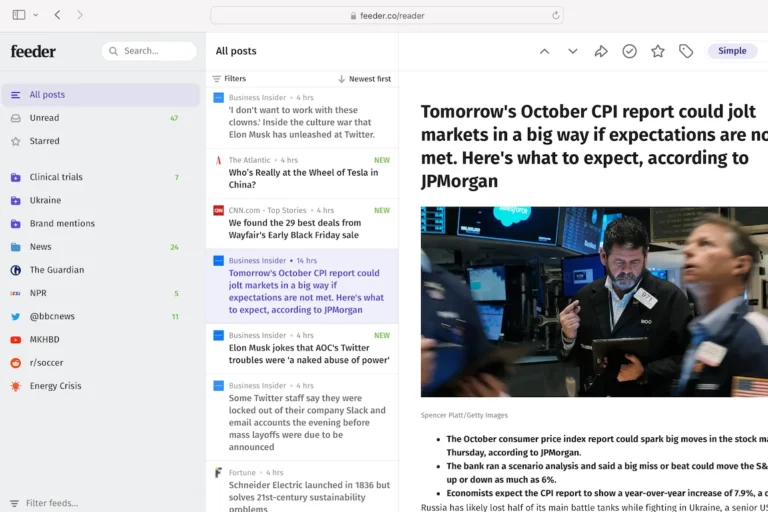
If you miss the social elements of classic RSS, The Old Reader recreates the vintage Google Reader experience. It pairs a simple three-pane layout with social features that let you share, like, and discuss articles with friends directly inside the app.
Lightweight Readers
Minimalist readers strip out ad trackers, heavy web scripts, and bloated page assets. When an article opens inside NetNewsWire or Feedbin, you see clean text and relevant images. This delivers instant page loads, smooth scrolling, and reliable offline caching when reading during travel or dead zones.
Next-Generation Aggregators and Read-It-Later Hybrids
The boundaries between RSS readers, bookmarking tools, and read-it-later apps have collapsed. Modern aggregators treat feeds, saved web pages, newsletters, and PDFs as a single intake stream.
Readwise Reader
Readwise Reader represents the modern standard for active research. Built for power readers, it integrates an RSS aggregator, a read-it-later tool (competing with Pocket and Instapaper), an EPUB reader, and a PDF annotator into one keyboard-first environment.
Instead of jumping between a feed reader and a separate bookmarking tool, you can triage incoming feeds with custom keyboard shortcuts, queue interesting articles, highlight passages, and add notes on the fly. Reader automatically syncs those highlights into personal knowledge bases like Obsidian, Notion, Logseq, or Roam Research. It also features Ghostreader, an AI assistant that can summarize long articles, pull out key takeaways, or answer questions about the text.
Flipboard and Visual Curators
If you prefer browsing news like a digital magazine rather than scanning chronological lists, Flipboard remains a strong alternative. While less suited for strict chronological tracking, Flipboard shines at transforming RSS feeds and web trends into visual flip-books organized by broad topics like design, food, or photography.
Taming Email Newsletters via RSS
One of the best ways to reclaim focus is pulling Substack, Beehiiv, and industry newsletters out of your primary email inbox. Services like Readwise Reader, Feedbin, and Inoreader give you dedicated email addresses for newsletter subscriptions. Newsletters arrive straight into your reader alongside your favorite feeds, keeping your email inbox reserved for direct communication.
Best RSS Feed Reader for Your Daily Routine
The best tool depends on how you handle information and which devices you rely on daily. Consider these three common reader profiles:
- The Academic, Market Researcher, or PR Specialist: Choose Inoreader or Feedly. You need automated keyword monitoring, deduplication, deep archive searching, and direct integrations with Slack or internal knowledge bases.
- The Deep Thinker and Note-Taker: Choose Readwise Reader. The ability to triage incoming feeds, annotate PDFs, and sync highlights directly to personal note archives makes it an unmatched intake tool.
- The Mindful Morning Reader: Choose NetNewsWire (for Apple users) or Feedbin paired with a native client like Reeder. You get a distraction-free, ad-free environment built entirely for undisturbed morning reading.
Getting Started in Three Steps
- Export and Consolidate: If you already use a feed reader, export your subscriptions via OPML. OPML is an open XML file format that lets you transfer your feed list between any major RSS service in seconds.
- Structure Folders by Reading Priority: Avoid grouping feeds strictly by topic. Instead, organize by priority using folders like
Must Read Daily(capped at 5–10 crucial sources),Weekly Deep Dives, andCasual Skim. This stops unread counts in lower-priority feeds from creating unnecessary anxiety. - Prune Ruthlessly: Your RSS feed is private territory. If a site publishes too often or drops in quality, unsubscribe immediately. RSS works best when you curate it aggressively.